Ultimate Day Trader Home Office Setup in 2026: Monitors, Gear & Desk Guide
If you’re trading from a laptop on a kitchen table, you’re fighting with one hand tied behind your back.
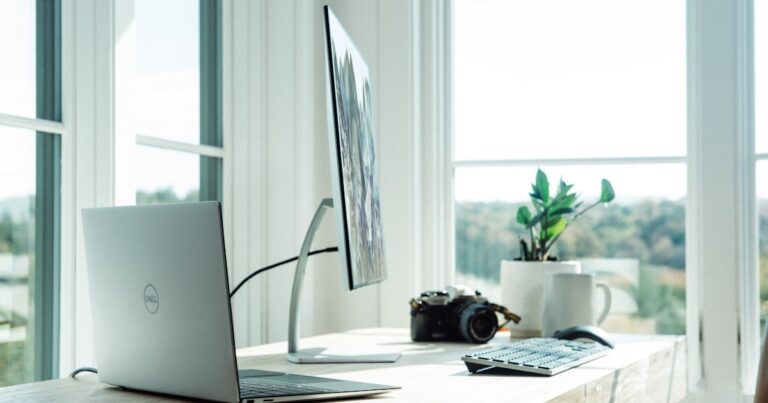
Serious day traders run purpose-built setups: multiple monitors, fast hardware, ergonomic furniture that holds up through 8-hour sessions, and a cable-managed desk that doesn’t become a distraction. This guide covers every component you need to build a professional home trading desk in 2026 — from monitor configurations to the exact gear used by full-time traders.
Quick Picks: Best Gear for a Day Trader Home Office
- Best Monitor for Trading: Dell UltraSharp U2723D (27″ 4K IPS)
- Best Budget Monitor: LG 27UK850-W (27″ 4K, USB-C)
- Best Monitor Arm: Ergotron LX Dual Stacking Arm
- Best Standing Desk: FlexiSpot E7 Pro (electric, 355 lb capacity)
- Best Chair: Secretlab Titan Evo (lumbar support, 8h+ sessions)
- Best Keyboard: Logitech MX Keys S (quiet, fast switching)
- Best Mouse: Logitech MX Master 3S (precision, programmable buttons)
- Best UPS: APC Back-UPS Pro 1500VA
Why Your Trading Setup Matters More Than You Think
Most traders obsess over strategies, indicators, and broker fees — and completely ignore their physical setup. That’s a mistake.
Your home office setup directly affects three things that matter for performance:
Speed of execution. When a setup hits, you have seconds. A lagging monitor, a slow mouse that slips on a cheap pad, or having to alt-tab between windows because you don’t have enough screen real estate — these cost you entries and exits.
Endurance. Day trading is physically and mentally taxing. A bad chair destroys your concentration after 3-4 hours. The right setup lets you trade at full capacity from market open to close.
Data visibility. Trading is about reading information quickly — price action, order flow, news, charts. More screen space = better pattern recognition = better decisions. This is why professional traders run 3-4 monitor setups, not one.
The Monitor Setup: How Many Screens Do You Actually Need?
2 Monitors: The Minimum Viable Setup
Two monitors works for swing traders and those who focus on 1-3 instruments. You can run your charting platform on one screen and your broker/news feed on the other.
3 Monitors: The Day Trader Standard
Three monitors is where most full-time day traders land:
- Monitor 1 (center): Primary chart — your main trading instrument
- Monitor 2 (left): Secondary charts + Level 2 / Time & Sales
- Monitor 3 (right): News feed, broker platform, watchlist
4 Monitors: For Active Traders Running Multiple Instruments
If you’re watching 5+ instruments simultaneously, 4 monitors gives you the real estate to keep everything visible without toggling windows.
Best Monitors for Day Trading in 2026
1. Dell UltraSharp U2723D — Best Overall Trading Monitor
The Dell UltraSharp U2723D is our top pick for most traders. It’s 27 inches, 4K IPS, covers 100% sRGB — critical for reading price action without eye strain during long sessions.
Why it’s built for trading:
- IPS panel: consistent colors at any viewing angle
- 4K resolution: more data visible at once
- USB-C with 90W power delivery
- Built-in KVM switch
2. LG 27UK850-W — Best Budget 4K Trading Monitor
For a 3-4 monitor setup on a budget, the LG 27UK850-W is the pick. It’s 27″ 4K IPS with USB-C and frequently goes on sale for under $300.
3. Ergotron LX Dual Stacking Monitor Arm
Monitor arms are non-negotiable for multi-screen setups. The Ergotron LX Dual holds two monitors on a single desk clamp, freeing up significant desk space.
The Trading Desk
Minimum desk size for a 3-monitor setup: 60 inches wide.
Best Desk: FlexiSpot E7 Pro Electric Standing Desk
- Height range: 22.8″ – 48.4″
- Max weight capacity: 355 lbs
- Dual motor, 4 programmable presets
The Chair
Best Chair: Secretlab Titan Evo 2022
The Secretlab Titan Evo has magnetic adjustable lumbar support and memory foam seat that holds up over years of daily use. Better ergonomics than most “office” chairs at 2x the price.
PC Specs for Day Trading
- CPU: Intel Core i5-12th gen or AMD Ryzen 5 5000+
- RAM: 16GB minimum; 32GB recommended
- GPU: NVIDIA RTX 3060 (supports 3-4 4K monitors)
- Storage: NVMe SSD
- Network: Wired ethernet — not Wi-Fi
Critical: Get a UPS
A UPS keeps your computer running during power outages. If you’re in a live trade when power goes out, you have 10-12 minutes to close positions cleanly.
Best UPS: APC Back-UPS Pro 1500VA
- 1500VA / 900W output
- AVR automatic voltage regulation
- 10 outlets (5 battery backup + 5 surge only)
Keyboard and Mouse
Logitech MX Keys S — quiet, connects to 3 devices, backlit. Perfect for early-morning sessions. 👉 Check price on Amazon
Logitech MX Master 3S — electromagnetic scroll wheel, 7 programmable buttons, precise on any surface. 👉 Check price on Amazon
Budget Breakdown
Entry-level 2-monitor setup (~$1,800):
- 2x LG 27UK850-W: ~$560
- Ergotron LX Dual Arm: ~$180
- FlexiSpot E5 desk: ~$350
- Mid-range chair: ~$300
- Keyboard + mouse: ~$200
- APC UPS: ~$180
Professional 3-monitor setup (~$3,200):
- 3x Dell UltraSharp U2723D: ~$1,350
- Ergotron LX arms: ~$350
- FlexiSpot E7 Pro: ~$580
- Secretlab Titan Evo: ~$450
- MX Keys S + MX Master 3S: ~$250
- APC Back-UPS Pro: ~$220
FAQ
Do I need 4K monitors for day trading? Highly recommended at 27″+. 4K gives you sharper text and more candles visible on charts without zooming out.
Can I use a laptop for day trading? Yes, but add at least one external 27″ monitor. A single screen is a significant handicap.
How important is internet speed? 50+ Mbps down is plenty. Latency and reliability matter more. Use wired ethernet.
Final Verdict
Start with monitor real estate — at minimum, two 27″ 4K monitors on arms. Add a standing desk and quality chair next. Get a UPS before you trade live. Build the rest incrementally.
Related Reading
- Best Monitor for Day Trading in 2026
- Best Multi Monitor Setup for Trading in 2026
- Best Ergonomic Chair for Home Office in 2026
- Best Standing Desk Under $500 in 2026
- Home Office Cable Management Guide
Disclosure: This site is reader-supported. When you buy through links on our site, we may earn an affiliate commission at no extra cost to you.